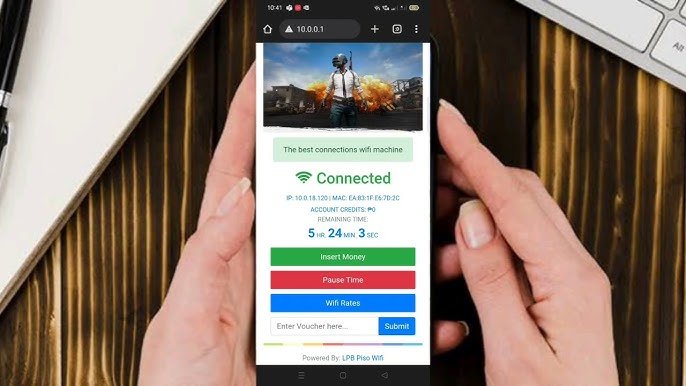
Piso WiFi Pause Time is a feature available on many Piso WiFi vending systems that allows users to temporarily pause their internet session without losing their remaining paid time. Instead of letting the timer continue while they are away from their device, users can pause the session and resume it later.
This feature is especially useful for people who need to step away from their phone, tablet, or laptop but do not want to waste their purchased internet time.
How Piso WiFi Pause Time Works
When the Pause Time feature is enabled by the network administrator, users can temporarily stop their active internet session.
The basic process usually works as follows:
- Connect to the Piso WiFi network.
- Open the Piso WiFi portal in your web browser.
- Log in to your active session.
- Select the Pause Time option if it is available.
- Resume your session later when you are ready to continue browsing.
The remaining time is preserved while the session is paused, depending on the system’s configuration.
Benefits of Using Pause Time
The Pause Time feature offers several advantages.
Some of the main benefits include:
- Saves unused internet time.
- Allows users to take breaks without losing minutes.
- Improves the overall user experience.
- Makes paid internet access more flexible.
- Helps users get better value from their purchased session.
For many customers, this feature makes Piso WiFi more convenient than systems that continuously count down the timer.
Why the Pause Time Option May Not Be Available
Some users cannot find the Pause Time button for several reasons.
Common causes include:
- The network owner has disabled the feature.
- The Piso WiFi software version does not support Pause Time.
- The session has already expired.
- The user is not logged into an active session.
- System maintenance or configuration changes.
If the option is missing, only the administrator can determine whether it is available.
How to Resume a Paused Session
If your session has been paused, resuming it is generally simple.
You usually need to:
- Reconnect to the Piso WiFi network.
- Open the login portal.
- Access your existing session.
- Select the Resume option.
The remaining internet time should continue from where it was paused.
Tips for Using Piso WiFi Efficiently
To make the most of your purchased internet time, consider these tips:
- Pause your session whenever you leave your device.
- Close unnecessary background applications.
- Download large files only when needed.
- Monitor your remaining session time.
- Use a stable Wi-Fi connection for better performance.
These practices can help maximize your internet usage.
Common Issues With Pause Time
Some users may experience problems while using the feature.
Possible issues include:
- Pause button not appearing.
- Session timing out unexpectedly.
- Login portal not loading.
- Browser cache causing display problems.
- Temporary network interruptions.
Restarting the browser or reconnecting to the Wi-Fi network may resolve minor issues. If the problem continues, contact the Piso WiFi owner or administrator.
Is Piso WiFi Pause Time Available on Every System
No. The Pause Time feature depends on the software version and the settings chosen by the Piso WiFi administrator. Some operators enable it for customer convenience, while others choose to disable it.
Before purchasing internet time, you can ask the network owner whether Pause Time is supported.
Final Thoughts
Piso WiFi Pause Time is a convenient feature that allows users to temporarily stop their internet session without losing their remaining paid time. When enabled, it provides greater flexibility and helps customers make better use of their purchased access. Since availability depends on the system administrator and software configuration, the feature may not be present on every Piso WiFi network.
Frequently Asked Questions
What is Piso WiFi Pause Time?
Piso WiFi Pause Time is a feature that lets users temporarily pause their internet session while preserving their remaining paid time.
How do I use the Pause Time feature?
Connect to the Piso WiFi network, open the login portal, and select the Pause Time option if it has been enabled by the administrator.
Why can’t I see the Pause Time button?
The feature may be disabled by the network owner, unsupported by the software version, or unavailable because your session has ended.
Does Pause Time save my remaining internet minutes?
Yes. When the feature is enabled and used correctly, your remaining session time is typically preserved until you resume the session.
Is the Pause Time feature available on all Piso WiFi systems?
No. Availability depends on the Piso WiFi software and the settings configured by the network administrator.